
How to Find the S/N on a Superb's Radio
The only thing you'll need to get the code is your radio's serial num. (not part number!).
On all Skoda's, you can find it in one of these places:
- Displayed on the radio screen (by using some combinations of buttons)
- On the radio body itself - you'll need to extract it and write down serial (which is not so hard).
Search for something that looks like: Serial Num., SN, S/N, Serial, Serial Number...
1. Viewing Superb's S/N on the Display
Skoda Superb radio does not display the serial number on the screen.
Unfortunately, the unit must then be extracted from the dashboard to find the serial on a factory sticker on the radio casing.
2. Find the Serial Number on the Radio Sticker
The serial number is usually printed on a label attached to the head unit.
Step 1: Turn off the ignition.
Step 2: After that, remove the dashboard trim.
Step 3: Then unscrew the radio brackets.
Step 4: Carefully slide the unit out partially (Be careful not to damage the cables that the unit is connected to).
Step 5: Look for the serial number on the rear of the unit.
Step 6: Write down the full number carefully and come back to our website so that we can generate your code.
Important: Don't mix the Serial Number from the Part Number!
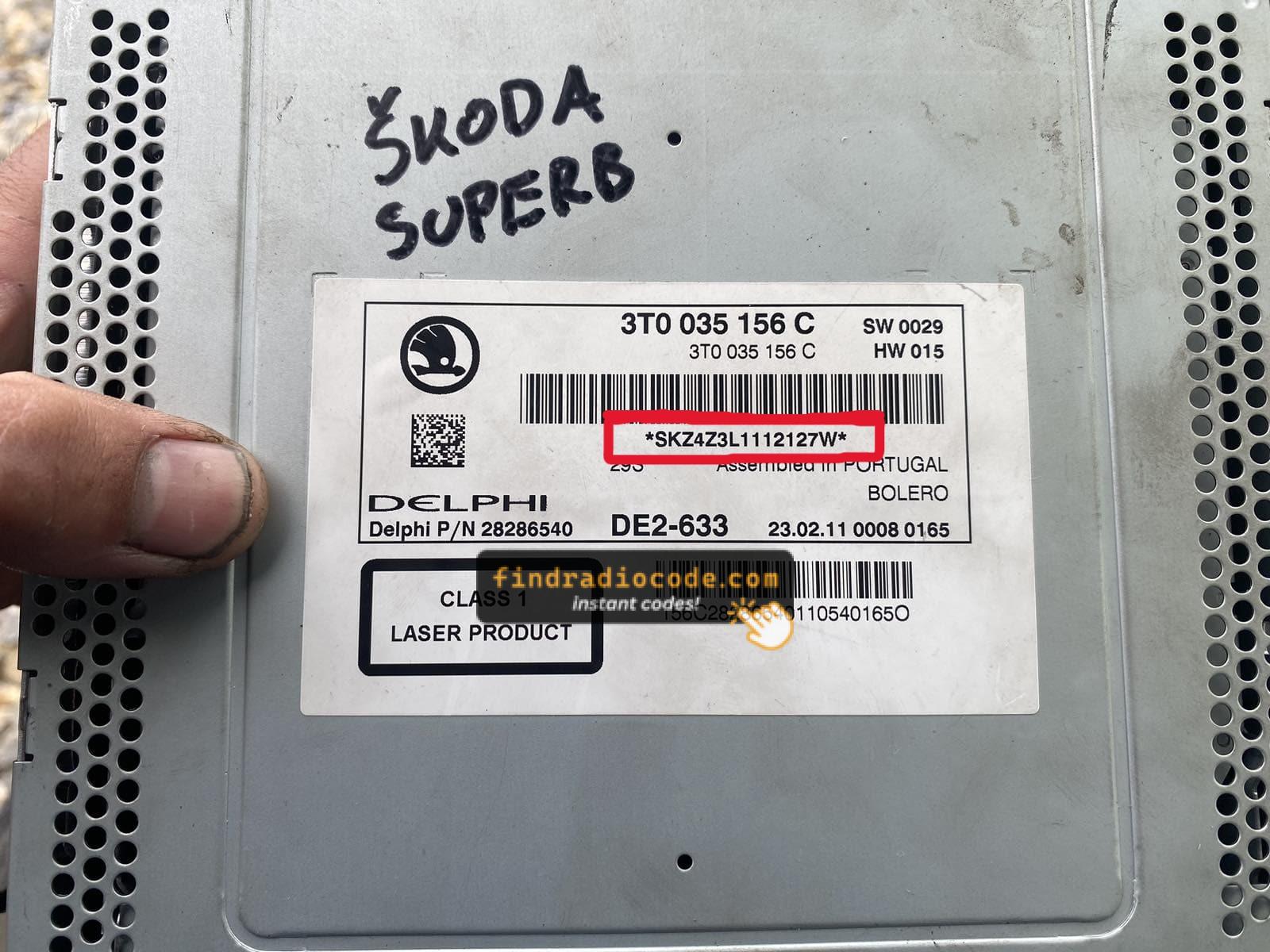
Example: Skoda Superb serial number label location
Common Serial Number Prefixes on Skoda Superb Radios
Your Skoda Superb radio serial number may start with:
SKZBP
Common Skoda Superb Radio Code Issues
Many owners encounter radio code issues on their Superb after electrical work.
Below are the most common situations when this can happen.
Lock After a Battery Work
After a battery change, your radio may stop working.
This happens because the radio recognizes a voltage interruption, which activates the security lock.
Other Scenarios
- After a jump-start, the radio may reset and request a radio code.
- When the head unit is removed, it usually locks automatically.
- If a fuse is pulled, the radio can enter anti-theft mode.
- After an ECU reset, software update, or electrical repair, some Skoda Superb radios display a CODE message.
Is Getting a Free Skoda Superb Radio Code Possible
Before you decide to pay, you should check a few places where the code is often already written down.
Some drivers find their Skoda Superb radio code without needing any tools or paperwork.
Here are the most common things to check first.
Look for it in the Vehicle Itself
- In the user guide, often on a separate code card.
- In the service booklet provided with the car.
- On the back of the radio if the unit was previously removed.
- On a label in the door pillar.
- Near the boot panel, where some manufacturers place radio labels.
Can the Dealer Get You the Code?
Dealerships can generate your radio code by checking the VIN in their system.
They typically ask for registration and ID before sharing the unlock code.
This is the official way to restore access to the factory radio.
Downsides:
- Some imported or older radios may need extra verification.
- You may need to contact service support during business hours.
- The lookup is often slower and may require waiting.
- Dealers frequently charge a service fee (It may cost more than 100$).
Why Use Our Skoda Superb Radio Code Lookup Service?
Our Skoda Superb radio code lookup is designed to avoid dealer visits.
Unlike traditional dealer lookup, this method requires no paperwork and can be done online in minutes.
It's a faster and cheaper alternative for drivers who need their radio unlocked quickly.
The Dealer vs FindRadioCode
- Delivery time: May take days, while FindRadioCode is instant 95% of the time.
- Availability: Dealers work Mon - Fri, while our service is 24/7.
- In-person visit: Lookup can require an appointment, while FindRadioCode works remotely.
- Pricing: It often costs 100 - 200 USD, while our service starts from 9.99 USD.
- Refund policy: Dealers usually offer no guarantee, while we include a full money-back guarantee.
You've Got the Code. How to Enter It?
Once you have the Skoda's radio code, you can enter it using the infotainment controls.
Most radios display "ENTER CODE", "----" or "XXXX" message when they are locked.
You typically use the rotary knob to input the code.
After entering the full code, the radio will restore normal operation.
Be careful, because too many wrong attempts can temporarily lock the radio.
It will allow you a few missed shots before showing a SAFE message.
You can try again by keeping the ignition on for an hour or a set waiting period.
Superb's Radio Code FAQs
Many of their radios use a security code, but not every model year or radio type requires one.
It depends on the head unit and production year.
Free security codes are rarely available.
Some online tools may help, but most codes require serial number lookup.
The only free possibility would be to search your car and its glovebox to see if you already possess the code.
Yes, each head unit has its own unique code. If you install a used radio, you'll need the code for that specific unit.