
Skoda Fabia's Most Common Radio Code Causes
Many drivers encounter radio lock problems on their Fabia after battery-related issues.
Below are the most frequent situations when this can occur.
Battery Change (Most Common)
When the battery is replaced, the Skoda Fabia radio enters anti-theft mode.
This factory protection system is designed to prevent theft by disabling the radio after power loss.
Other Situations That Trigger a Radio Code on Skoda Fabia
- Installing a replacement head unit will trigger the original anti-theft code.
- After an ECU or software reset, the radio may lock.
- A blown fuse can cause the Skoda Fabia radio to request a security code.
- Jump-starting the vehicle can trigger anti-theft mode, requiring the PIN.
Can I get a Free Skoda Fabia Radio Code?
Looking for a free Skoda Fabia Radio Code? Actually, you may already have it.
In few cases, the code may already be available in the vehicle itself or in the documentation.
Checking these sources can save you time and money before using an online lookup tool.
Below are the simplest places to look.
Check the Car Itself
- In the owner's manual, often on a sticker page.
- Inside the center console, sometimes on a label.
- In the trunk, on a service sticker.
- In your maintenance booklet from the previous owner.
- On the head unit itself, if it was removed before.
Can the Dealer Get It for You?
A Skoda dealer can usually look up the radio code using your Fabia's VIN.
In most cases, you need to contact the service department or visit the dealership and prove ownership.
When it is verified, they can generate the original anti-theft code for your radio.
Disadvantages:
- You usually need to book an appointment and bring ID.
- Dealers often ask for payment for the lookup service and it's sometimes more than 100$.
- The process can take hours depending on the model and database.
- Some older Skoda Fabia radios may not be supported.
Finding the Serial N. on a Fabia's Radio
The only thing you'll need to get the code is your radio's serial num. (not part number!).
On all Skoda's, you can find it in one of these places:
- Directly on the radio screen (by using some combinations of buttons)
- On the radio unit itself - you'll need to pull it out and write down your serial (which is not as hard as it seems).
Search for something like: Serial Num., SN, S/N, Serial, Serial Number...
1. View the Serial Number on Skoda Fabia's Screen
Unfortunately, on Skoda Fabia radios the serial number cannot be viewed on the screen.
In that case, you'll need to remove the radio unit and check the label on the side of the radio.
2. Find the S/N on the Radio Unit's Sticker
To find the serial number, you'll need to remove the radio unit out.
- Start by turning off the ignition and removing the trim panel.
- Next, release the clips and slide the radio out to check the sticker on the side of the radio. Be careful not to damage the cables.
- Write down full serial number precisely and come back to the website.
- Know that serial number and part number are not the same. You can find both on the sticker, and you only need for the first one.
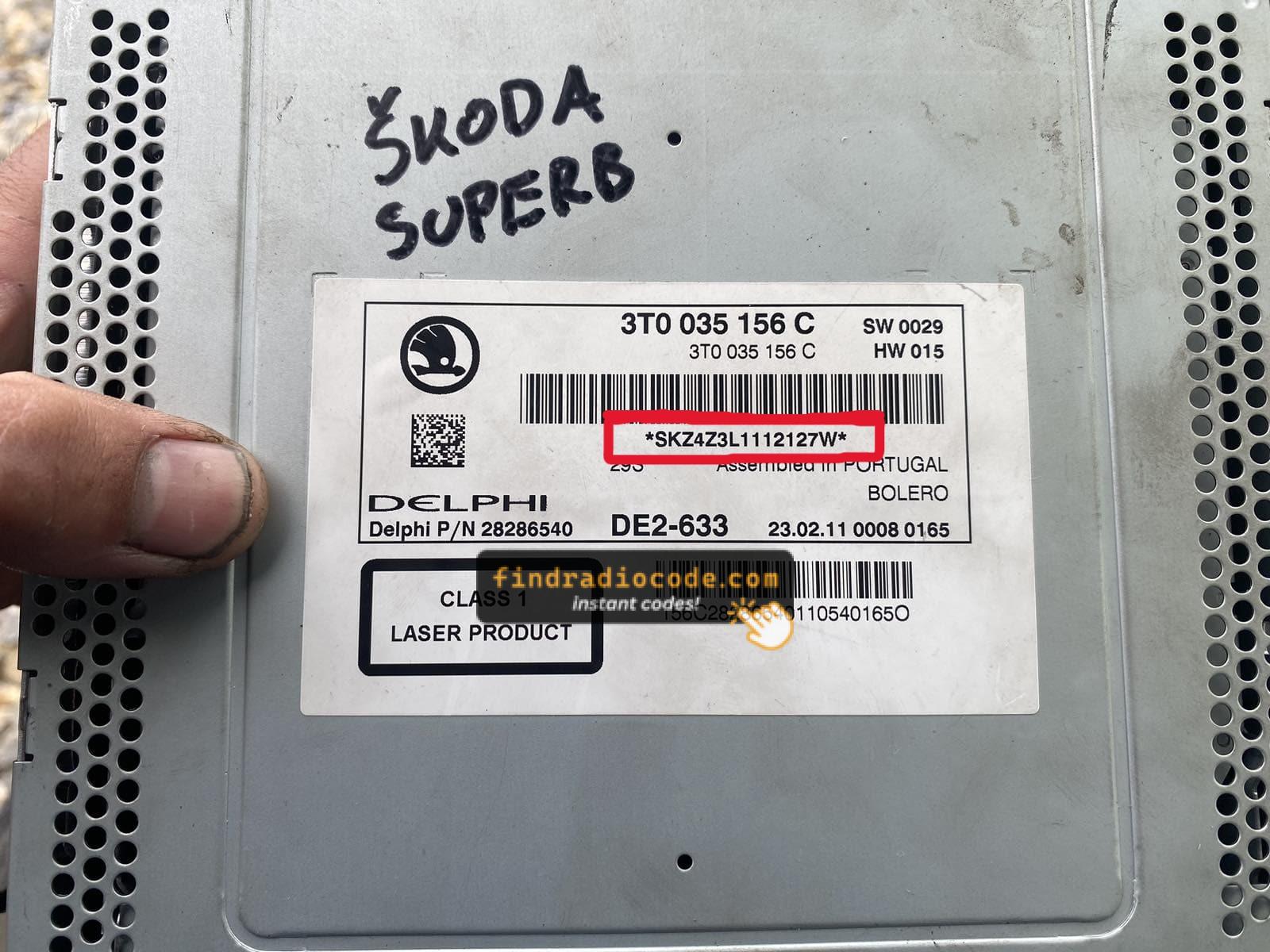
Example: Skoda Fabia serial number label location
Common Serial Number Prefixes on Skoda Fabia Radios
Your Skoda Fabia radio serial number may start with:
SKZBP
Why Use Our Skoda Fabia Radio Code Lookup Service?
Our Skoda Fabia radio code lookup service retrieves the security code using the stereo serial.
Compared to dealership VIN lookup, this Skoda Fabia radio code generator is faster, doesn't require appointments, and costs less.
It's an easy way to restore access to your factory radio without leaving your home.
The Dealer's VIN Lookup vs FindRadioCode
- Delivery time: May take days, while FindRadioCode is almost instant 95% of the time.
- Availability: Dealers work business hours only, while our service is always available.
- In-person visit: Lookup can require a visit, while FindRadioCode works remotely.
- Pricing: It often costs over $100, while our service starts from 9.99$.
- Refund policy: Dealers usually offer limited refunds, while we include a full money-back guarantee.
You've Got the Code. How to Enter It?
You need to input the anti-theft code into the system to unlock your Skoda's radio.
In the locked unit, the screen usually shows a code prompt.
Based on the radio, use radio presets, control knob, or touchscreen to enter the numbers, then submit the code to reactivate the audio system.
Try not to make mistakes, because too many wrong attempts can disable your radio temporarily.
It allows a few incorrect tries before showing a LOCKED message.
You can try again by keeping the ignition on for 60 minutes or a set waiting period.
Frequent Questions about Skoda Fabia Radio Code
Many of their radios use a security code, but not every model year or radio type requires one.
It depends on the factory stereo and production year.
Free radio codes are rarely available.
Some online tools may help, but most codes require serial number lookup.
The only free possibility would be to check your car and its documentation to see if you already possess the code.
Yes, each head unit has its own security code. If you install a used radio, you'll need the code for that specific unit.