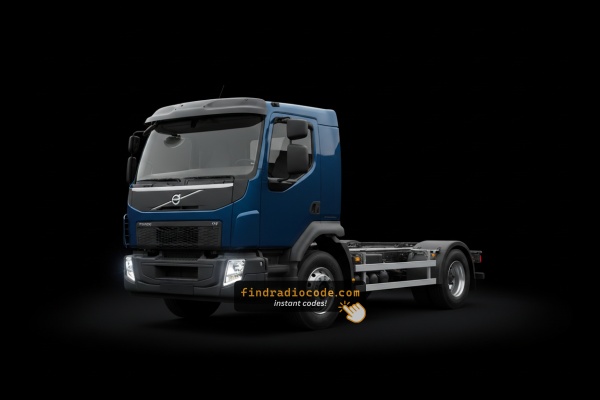
Where to Search for the Serial Number on your FL (Truck)
To get the correct radio code, you first need the serial number from the radio.
Depending on your FL (Truck), you can see it on the screen or find it on the radio unit itself.
Common abbreviations are S/N, SN, Serial, Serial Num., Serial Number...
These are the easiest ways to find it:
1. Viewing FL (Truck)'s S/N on the Display
Volvo FL (Truck) radio does not show the serial number on the screen.
Unfortunately, the unit must then be extracted from the dashboard to find the serial on a manufacturer label on the radio casing.
2. Locating your Serial Number on the Radio Unit
To find the serial number, you'll need to remove the radio unit out.
- Start by turning off the vehicle and taking off the dashboard bezel.
- Next, release the clips and slide the radio out to check the sticker on the side of the radio. Be careful not to damage the cables that the unit is connected to.
- Write down the serial number precisely and then come back to our website.
- Know that serial number and part number are not equal. You can find both of them on the unit, but you only need for the first one.
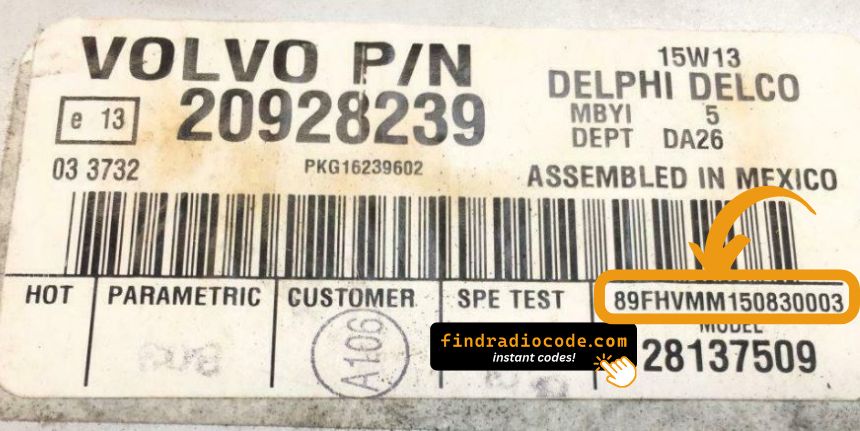
Example: Volvo FL (Truck) serial number label location
Typical Volvo FL (Truck) Radio Serial Number Formats
Your Volvo FL (Truck) radio serial number may start with:
BPCC
Volvo FL (Truck)'s Most Common Radio Code Causes
Your radio may request a security code when it loses power.
These are the most common scenarios that trigger the radio code prompt.
Battery Change (Most Common)
When the battery is disconnected, the Volvo FL (Truck) radio enters anti-theft mode.
This factory protection system is designed to prevent theft by disabling the radio after power loss.
Other Scenarios
- Installing a replacement head unit will trigger the original anti-theft code.
- After an ECU or software reset, the radio may lock.
- A blown fuse can cause the Volvo FL (Truck) radio to lock.
- Jump-starting the vehicle can trigger anti-theft mode, requiring the unlock code.
Can I get a Free Volvo FL (Truck) Radio Code?
Before you decide to pay, you should check a few places where the code is often already written down.
Some drivers find their Volvo FL (Truck) radio code without needing any tools or paperwork.
Here are the most common things to check first.
Look for it in the Vehicle Itself
- In the owner's manual, often on a code card.
- Inside the glovebox, sometimes on a small card.
- In the spare wheel area, on a radio label.
- In your car paperwork from the previous owner.
- On the radio unit itself, if it was serviced earlier.
Getting a Volvo FL (Truck) Radio Code from the Dealer
A Volvo dealer can usually look up the security code using your FL (Truck)'s vehicle identification number.
In most cases, you need to contact the service department or visit the dealership and prove ownership.
When it is verified, they can request the original anti-theft code for your radio.
Disadvantages:
- You usually need to book an appointment and bring vehicle paperwork.
- Dealers often charge a fee for the lookup service and it's sometimes more than 100$.
- The process can take days depending on the model and database.
- Some older Volvo FL (Truck) radios may require manual lookup.
Why Choose Our Volvo FL (Truck) Radio Code Generator Service?
Our Volvo FL (Truck) radio code lookup service retrieves the anti-theft code using the stereo serial.
Compared to dealership VIN lookup, this Volvo FL (Truck) radio code generator is more convenient, doesn't require appointments, and costs less.
It's an easy way to restore access to your factory radio without leaving your home.
The Dealer vs FindRadioCode
- Dealer services often charge high fees, while FindRadioCode offers codes from 9.99 USD.
- Some dealers require visiting the service center and showing documents, while FindRadioCode is fully remote.
- Dealer lookup can take days, while our system delivers codes right away 95% of times.
- Dealerships operate during weekdays, while FindRadioCode is available anytime.
- Dealer lookups often come with no guarantee, while FindRadioCode offers a full money-back policy.
Entering the Radio Code on Volvo FL (Truck)
You need to type in the code into the system to unlock your Volvo's radio.
When the unit is locked, the screen usually displays a code prompt.
You should use control knob, touchscreen, or radio presets to set each digit, then submit the code to reactivate the audio system.
If you fail multiple times, you may cause the FL (Truck)'s head unit to enter lockout mode.
When this happens, the screen can display messages like "CODE ERR", "ERROR", or a blank screen.
To unlock the system, you usually need to keep the ignition on for a waiting period or up to a full hour before trying again.
What is a Radio Code?
A radio unlock code, sometimes also known as an anti-theft code is a security PIN that restores access to your car stereo after it has been locked.
This factory security PIN is triggered when the radio loses power.
Car manufacturers use this security system to prevent stolen radios from being reused.
If power is lost, the radio locks automatically and requires the unlock CODE before it can function normally.
Once the valid numbers combination is entered, the stereo is fully reactivated.
FL (Truck)'s Radio Code FAQs
Not all of them require a radio code, but many factory radios use it as an security measure.
Newer and older models may not require a code depending on the head unit.
Free codes are uncommon.
You might already possess the code in the paperwork or from a dealer, but most require a paid retrieval.
Yes. Each radio unit has its own unlock code. A replacement radio will need its original code to work.