How to Get Porsche Radio Code?
If your radio security code is lost, you have a few options.
Dealer Option (Slow, VIN Required, With Paperwork)
One way to retrieve it is by contacting a dealer, car manufacturer, or authorized service center.
They typically ask for your Vehicle Identification Number (VIN), proof of ownership and vehicle documents, and sometimes even a registration certificate.
The process is usually inconvenient.
Some charge a fee (which can be expensive), while others offer it for free - but it can take hours or days.
Response times and fees depend on the brand and location.
This method is official but not ideal if you need the code quickly.
Find Radio Code - Fast, Reliable and Cheap
There's a much faster way - use our instant Porsche radio code generator.
All you need is your radio's serial number, which can be found on the unit, retrieved from the screen or located on the sticker.
There's zero paperwork involved, and the code is displayed instantly and sent to your email.
Coverage includes a wide range of Porsche units.
Find Radio Code handles everything automatically, and we offer a money-back guarantee if it doesn't work.
The 100% easiest and cheapest way to unlock your radio.
Dealer vs Find Radio Code
|
Dealer |
Find Radio Code |
| Delivery time | Same day or several days | Instant 95% of times |
| Availability | Business hours only | 24/7 |
| In person visit? | Sometimes | Never |
| Pricing | $120-$200 | From $19.99 |
| Refund | No guarantee | Always |
How to Find the Serial Number (S/N) on Your Porsche
By Removing the Radio Unit (Most Common Method)
For most vehicles, the serial number is printed on a sticker attached to the side of the unit.
To access it, you'll need to slightly extract the stereo using a panel lever.
- Look for a white or yellow sticker marked "Serial" or "S/N"
- The serial is usually a mix of letters and digits, 8-14 characters long
- Avoid confusing it with the part number - only serial can be used for code generation
Physical removal is often the most reliable way to access your S/N.
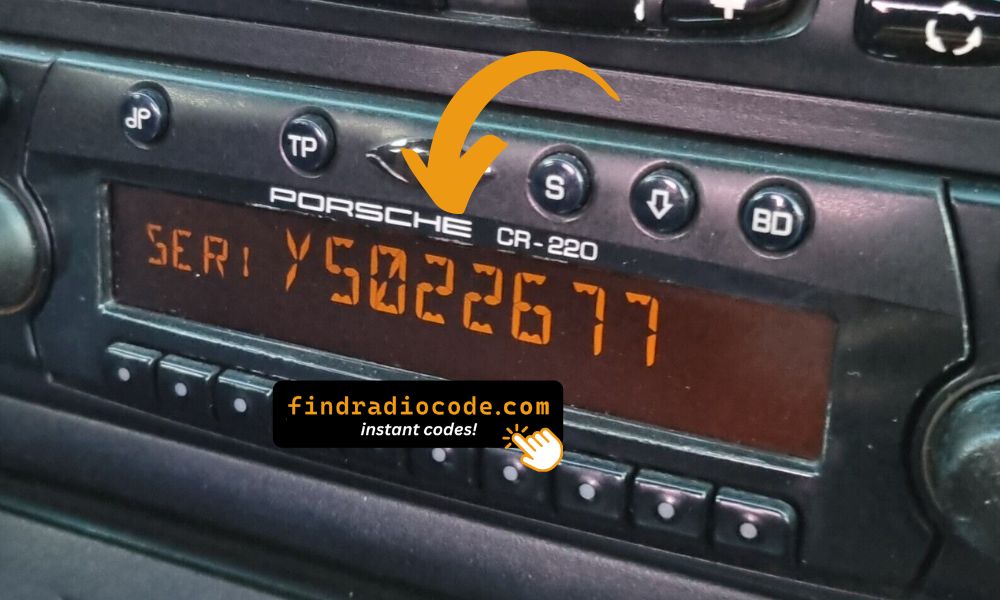
Serial Number on Screen Display
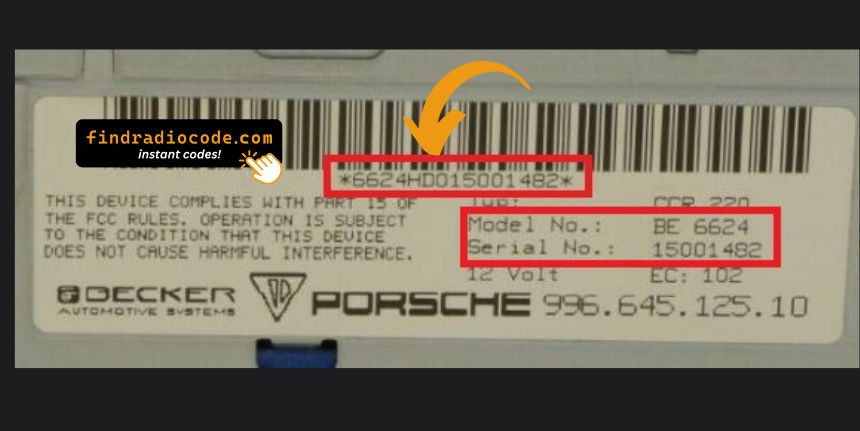
Serial Number on Back Label
Pro Tip: For most Porsche Becker radios, you can display the serial number directly on the screen without removing the unit. See the instructions in the FAQ above!
On the Screen (No Removal Needed)
Some touchscreen-equipped radios allow you to see the S/N via a button combination.
- Try holding buttons 2 & 6 while turning on the radio
- A hidden menu may reveal the S/N
- The combination of buttons for every radio is different.
This works only in some cases.
The Difference Between the Serial Number (S/N) and Part Number (P/N)
The Serial Number (S/N):
- This is the unit-specific code assigned to your specific radio.
- It's used by our radio code generator.
- Usually found on a label marked "S/N" or "Serial".
The Part Number:
- This refers to the radio series of the unit.
- It's used by manufacturers for replacement purposes, but irrelevant for unlocking your stereo.
- Usually labeled "P/N" or "Part No.".
How to Enter the Security Code
Entering the code into your radio takes just a few steps.
You'll see a prompt like "CODE", "ENTER CODE" or four dashes on startup.
Use the radio preset buttons or numbered keys to enter the code.
Some models require you to press a specific button - such as pressing "OK," "Enter," or "5" to confirm or holding "Seek", "Tune" or the preset key.
Be careful not to enter the wrong code multiple times.
Lockouts vary by brand, from a few minutes to several hours.
Refer to your manual or contact us if you're unsure about the input method. Our guides cover the steps.
How Our Porsche Radio Code Unlock Works?
Getting your Porsche radio code has never been faster or more reliable.
From Serial to Code: How It Works
Using our lookup tool is simple.
Just enter your radio's serial number, and our system matches it to the correct anti-theft code.
There's no dealership visit, and the entire lookup is automated.
Our system includes thousands of OEM radios, ensuring high compatibility and accurate delivery.
How Long Will You Wait?
- Instant on-screen code display
- Also sent via email for backup
- If your radio isn't fully supported, we'll notify you before payment
- In that case, you may get the code in 1 hour, or 24h at most
Secure, Proven, and Risk-Free
We've helped thousands of users unlock their factory radios with a verified track record.
No VIN required, no personal data collected - just your radio's serial. Our lookup system is designed for speed and safety.
If the code doesn't work, don't worry. Just send a short video showing the code entry and serial number, and you'll get back a full refund - no questions asked.
Frequently Asked Questions
What is an Anti-Theft Code and Why It's Needed?
A radio, an anti-theft or a security code is a PIN-style security code used to reactivate your radio after power loss.
This feature protects against theft by locking the radio when power is interrupted.
When Does Porsche Radio Ask for a Code?
- You recently changed or disconnected the battery
- You installed a new or used radio
- There was an electrical issue affecting the radio fuse
- You jump-started the vehicle
- A reset cleared the saved code
- Vehicle was serviced or scanned
- Someone entered incorrect codes too many times
- A previous owner didn't supply the radio code
- Inactivity can cause the anti-theft lock to engage
Does Porsche vehicles Require an Unlock Code?
Yes, all Porsche vehicles with factory-installed Becker radios require a radio code after battery disconnection or radio replacement. This applies to all models including 911 (996, 997, 991), Boxster, Cayenne, Cayman (981, 987), Macan, and classic models like 944.
The anti-theft feature is standard on all Porsche Becker radios. Your 4-digit or 5-digit code is permanently linked to your radio's unique serial number (starting with BE).
Finding a Stored or Printed Radio Code
Start by inspecting the user guide. The code is sometimes found on a detachable slip or written directly on a dedicated panel.
You can also look the glovebox or trunk, where dealers or previous owners may have stuck a sticker with the code. Some also search for it behind trim pieces or inside the fuse box.
If you have the original manufacturer label, that's the best place to find the code - it usually includes both the serial number and unlock key.
Can You Get Free Porsche Radio Code?
There are a few options - but they aren't guaranteed.
- Check your owner's manual or code card - some vehicles came with the code printed at delivery.
- Contact your dealership - some offer free code retrieval if you're the original owner and can provide registration papers.
- Try DIY forums or online databases, but these are risky and rarely accurate.
- If none of these work, our service is the fastest and most accurate option.


 Porsche