
How to Find the S/N on a Ka's Radio
The only thing you'll need to get the code is your radio's serial num. (not part number!).
On all Ford's, you can find it in one of these places:
- Displayed on the radio screen (by using some combinations of buttons)
- On the radio body itself - you'll need to pull it out and write down your serial (which is not as hard as it seems).
Search for something like: Serial Num., SN, S/N, Serial, Serial Number...
1. View the Serial Number on Ford Ka's Screen
Ford Ka radio does not show the serial number on the screen.
Unfortunately, the unit must then be physically removed to find the serial on a factory sticker on the radio casing.
2. Find the S/N on the Radio Unit's Sticker
The serial number is usually located on a sticker attached to the radio casing.
Step 1: Turn off the vehicle.
Step 2: After that, remove the dashboard trim.
Step 3: Then unscrew the radio brackets.
Step 4: Carefully slide the unit out partially (Be careful not to damage the cables that the unit is connected to).
Step 5: Look for the serial number on the rear of the unit.
Step 6: Write down the full S/N carefully and come back here so that we can generate your code.
Important: Differentiate the Serial Number from the Part Number!
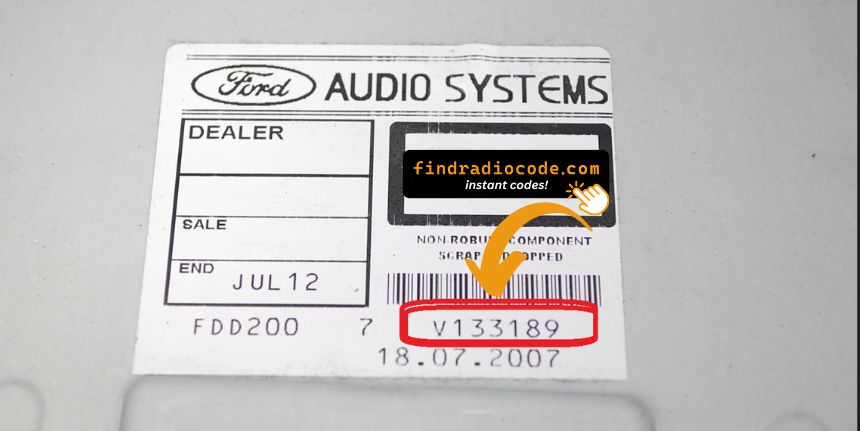
Example: Ford Ka serial number label location
Common Serial Number Prefixes on Ford Ka Radios
Your Ford Ka radio serial number may start with:
MV
Common Ford Ka Radio Code Situations
Many owners encounter radio code issues on their Ka after power loss.
Below are the most frequent situations when this can happen.
Lock After a Battery Change
After a battery replacement, your radio may show a CODE message.
This happens because the radio loses power, which triggers the security lock.
Other Situations That Trigger a Radio Code on Ford Ka
- After a boost start, the radio may lose power and request a radio code.
- When the radio is replaced, it usually locks automatically.
- If a fuse blows, the radio can enter anti-theft mode.
- After an ECU reset, software update, or electrical repair, some Ford Ka radios display a CODE message.
Can I get a Free Ford Ka Radio Code?
Looking for a free Ford Ka Radio Code? Actually, you may find it.
In few cases, the code may already be available in the vehicle itself or in the documentation.
Checking these sources can save you time and money before using an online generator.
Below are the most reliable places to look.
Check the Car and Its Documentation
- In the radio manual, often on a separate code card.
- In the vehicle documentation provided with the car.
- On the radio chassis if the unit was previously removed.
- On a label in the door pillar.
- Near the spare tire, where some manufacturers place radio labels.
Can the Dealer Get It for You?
Dealerships can retrieve your radio code by checking the vehicle records in their system.
They typically require proof of ownership before sharing the unlock code.
This is the official way to restore access to the factory radio.
Downsides:
- Some imported or older radios may not be in their database.
- You may need to contact service support during business hours.
- The lookup is often slower and may require waiting.
- Dealers frequently bill for the code (It may cost more than 100$).
Why Use Our Ford Ka Radio Code Lookup Service?
Our Ford Ka radio code lookup is designed to avoid dealer visits.
Unlike traditional dealer lookup, this method doesn't require VIN and can be done from home in minutes.
It's a more convenient and cheaper alternative for drivers who need their radio unlocked quickly.
The Dealer vs FindRadioCode
- Dealer services often charge high fees, while FindRadioCode offers codes from 9.99$.
- Some dealers require a visit to the service center, while FindRadioCode is fully online.
- Dealer lookup can take time, while our system delivers codes right away 95% of times.
- Dealerships operate during weekdays, while FindRadioCode is available 24/7.
- Dealer lookups often come with limited refunds, while FindRadioCode offers a full money-back policy.
Now You Have the Code. How to Enter It?
Once you have the Ford's security code, you can type it in using the radio buttons.
Most radios display a "CODE", "ENTER CODE", or "----" message when they are locked.
You typically use the number keys to select each digit.
After entering the full code, the radio will unlock automatically.
Be careful, because too many wrong attempts can temporarily lock the radio.
It will allow you a few missed shots before showing a WAIT message.
You can try again by keeping the ignition on for one hour or a set waiting period.
Frequent Questions about Ford Ka Radio Code
Many of their radios use a security code, but not every model year or radio type requires one.
It depends on the factory stereo and production year.
Free security codes are rarely available.
Some online tools may help, but most codes require serial number lookup.
The only free possibility would be to search your car and its glovebox to see if you already possess the code.
Yes, each radio unit has its own security code. If you install a replacement radio, you'll need the code for that specific unit.